NotebookLM vs ChatGPT Projects vs Claude Projects: Which Fits Research Work?
NotebookLM vs ChatGPT Projects vs Claude Projects: Which Fits Research Work?
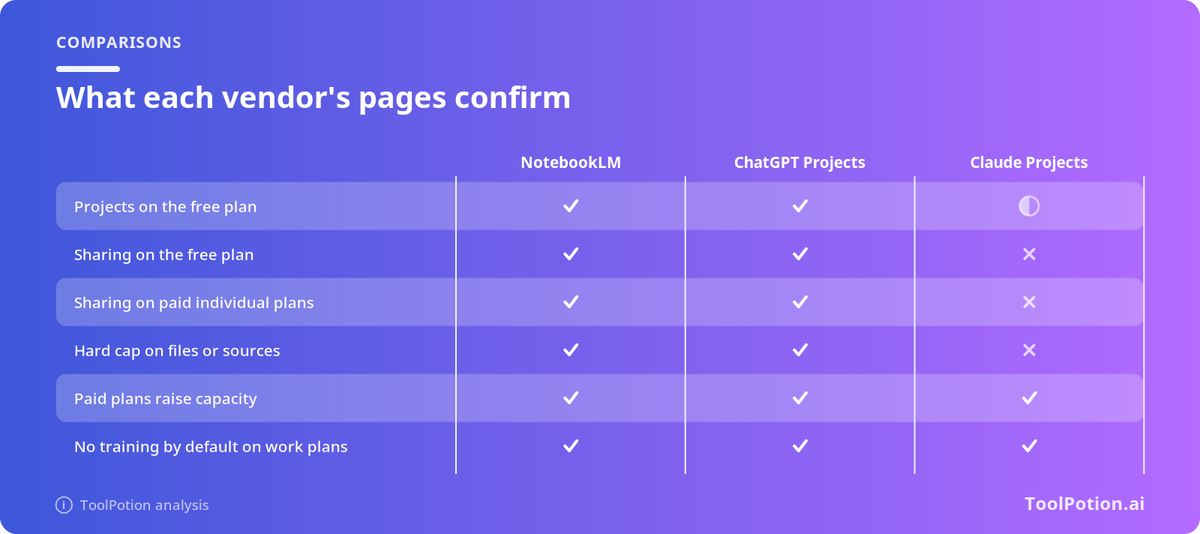
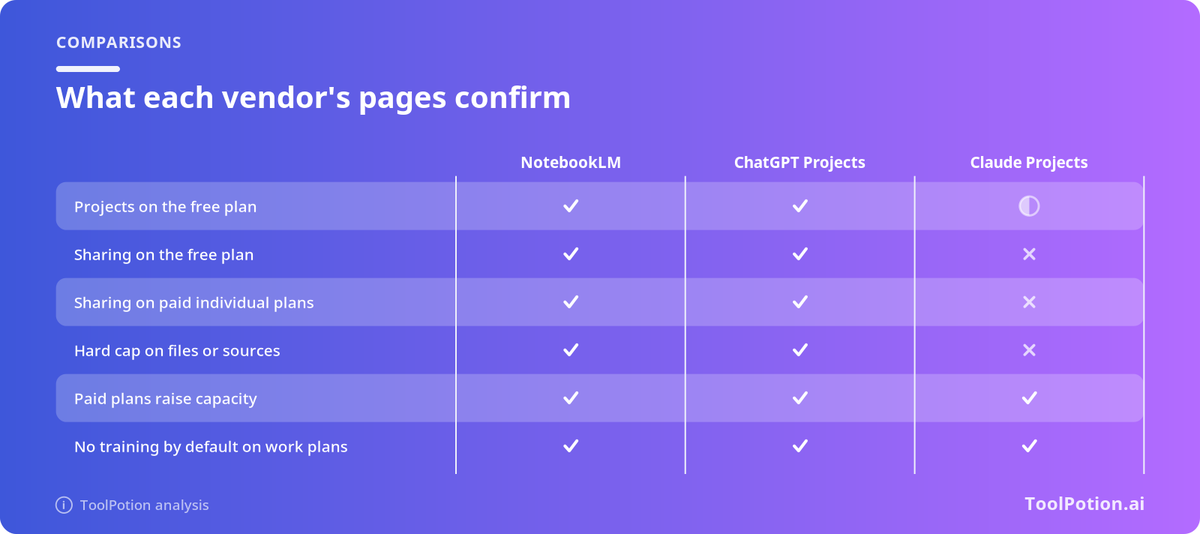
If your sources are the product, pick NotebookLM. If your work is a conversation that happens to need files, ChatGPT Projects or Claude Projects usually fit better. That is the short version. The longer version matters because all three vendors sell some form of "upload your pile and ask questions," plans keep shifting, and the differences that hurt are boring: how many files, how big, who can see them, and whether a client PDF ends up eligible for training.
Disclosure: This piece is from the ToolPotion Media Team. ToolPotion is our product. Details below track our NotebookLM vs Projects comparison. Hashnode marks outbound links as nofollow ugc.
Naming note
Google's help center and AI plan pages have also used "Gemini Notebook," while most of the web still says NotebookLM. Same product family. We use the familiar name here. Everything that follows is grounded in vendor help/pricing language as summarized in our guide, not in a private bake-off score.
How each one grounds answers
Grounding is the category. You want answers from your sources, not from half-remembered training data.
NotebookLM / Gemini Notebook. Google describes chatting with a notebook to get grounded information based on your sources with clear in-line citations. You can pick a subset of sources in the panel and keep chat inside them. Limits still exist: with many sources the system retrieves the most relevant passages first, so a vague question can miss the passage you cared about. Very short sources may be referenced as a whole without a tight span citation.
Claude Projects. A project is a workspace with its own chats, a knowledge base, and instructions you write once. On paid plans, when knowledge approaches the context limit, Claude switches to retrieval; Anthropic has described that as expanding capacity substantially (on the order of up to 10x in their help language). The help pages we tracked emphasize context and retrieval more than Google-style click-through citations to an exact passage.
ChatGPT Projects. Best thought of as a durable bundle of chats, files, and instructions inside ChatGPT. It optimizes for people who already live in that product and want less "Final_FINAL" chat entropy. Treat it as conversation-first with files attached, not as a citation-first research notebook.
Chooser table
| Job | Lean toward |
|---|---|
| Fixed PDF/source pack with inline citations | NotebookLM |
| Ongoing client workspace already in ChatGPT | ChatGPT Projects |
| Long-doc synthesis with Claude-style writing | Claude Projects |
| Live web questions with citations | None of these — use AI search tools |
That last row matters. Projects are not a substitute for web AI search. For open-web questions, compare Perplexity vs ChatGPT Search vs Google AI Mode instead.
Limits and sharing (the boring pain)
Before you standardize a team:
- Read the current source caps (count and size) on the plan you actually pay for.
- Check sharing: can a teammate see the files, or only the chat?
- Check retention and training terms for the tier you use. Consumer defaults are not enterprise defaults. Walk the questions in our privacy framework.
- Export anything that must survive a vendor UI change.
Research hygiene that beats tool hopping
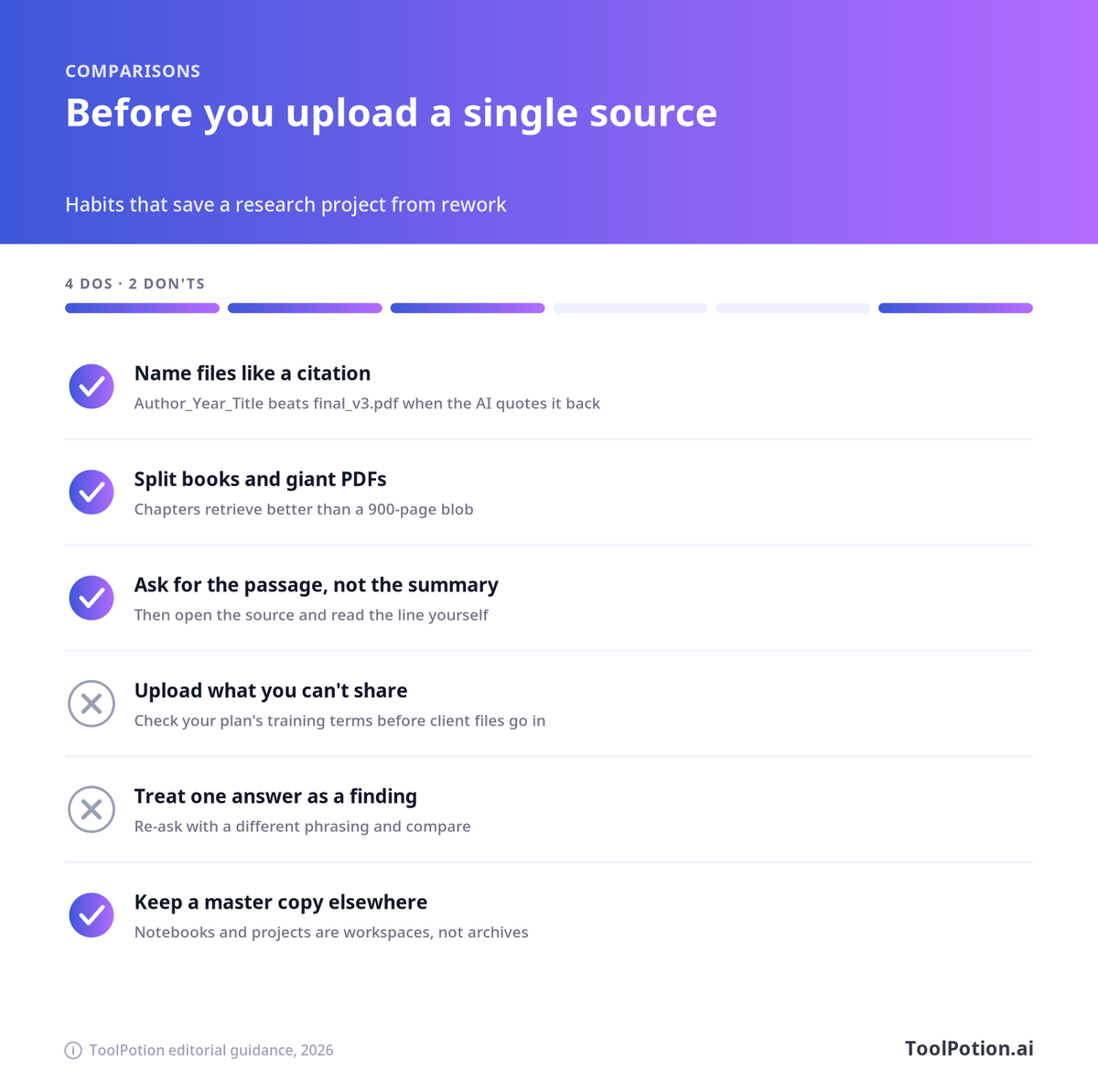
- Name projects by outcome ("Q4 pricing memo"), not by tool brand.
- Keep a human outline before you ask for a draft.
- Freeze source versions when you ship a deliverable.
- Do not triplicate the same corpus across all three products.
- Verify quotes against the PDF. Citations help; they do not replace reading.
A one-day migration
Morning: pick one primary tool for the quarter. Afternoon: move only the active project's sources and instructions. Evening: archive zombie chats. Add a 10-line README so the next hire does not invent a fourth workspace.
When to pay
If you hit source caps weekly, need shared workspaces with access control, or handle client-confidential files, pay for the tier that documents those controls. Free tiers are fine for personal learning. They are a weak foundation for client delivery.
Practical takeaways
- NotebookLM when sources and citations are the product.
- ChatGPT/Claude Projects when conversation plus files is the product.
- Keep web search in a separate lane.
- Standardize on one primary workspace per team.
Full write-up: NotebookLM vs ChatGPT Projects vs Claude Projects.
Source caps and why vague questions fail
When a notebook or project holds many files, retrieval is doing quiet triage. The system pulls what it thinks is relevant and answers from that subset. If you ask "summarize the strategy," you may never touch the appendix that had the pricing constraint. Ask narrower questions: "What did the March pricing memo say about annual discounts?" Point at file names when the UI allows. NotebookLM's strength is grounding with inline citations; your job is to ask questions that give those citations a chance to appear.
Claude Projects' retrieval expansion on paid plans helps when the knowledge base grows, but it is still retrieval. It is not magic omniscience over every byte you uploaded. ChatGPT Projects similarly depend on what is in the project and what the model retrieves into context. Treat all three as systems with attention budgets.
Team rollout pattern
Week 1: pick one pilot team and one tool. Week 2: migrate two live projects and measure time-to-first-useful-answer plus how often people still reopen old chats. Week 3: write the sharing rules (who can invite, what file classes are banned, how exports work). Week 4: either standardize or stop. Endless parallel pilots create three incomplete archives and zero institutional memory.
Security should sit in week 1, not week 4. If client PDFs are involved, confirm training and retention terms before the first upload. It is cheaper than a cleanup.
ToolPotion Media Team
About the author
- We're a small team behind ToolPotion, an AI tools directory. We write about choosing tools, what's working in AI right now, and the lessons we pick up running a directory. toolpotion.ai
Comments
Join the discussionNo comments yet. Be the first to comment.